

Semantic Kernel Integration
Overview
Section titled “Overview”Semantic Kernel is a lightweight SDK from Microsoft that integrates Large Language Models (LLMs) with conventional programming languages. It allows developers to create AI applications that combine semantic and symbolic AI techniques.
Key Features
Section titled “Key Features”- Plugin Architecture: Create, share, and compose AI capabilities
- Multi-Language Support: Available for C#, Python, Java, and more
- Memory Management: Built-in state and context handling
- Planning Capabilities: Enable LLMs to solve complex problems
- Hybrid AI Approach: Combine traditional code with AI components
Use Cases
Section titled “Use Cases”- Building intelligent applications with natural language interfaces
- Creating domain-specific assistants with specialized knowledge
- Developing autonomous agents that can plan and execute tasks
- Enhancing existing applications with AI capabilities
- Implementing complex workflows combining code and AI reasoning
Setup Instructions
Section titled “Setup Instructions”-
Install Semantic Kernel:
- For .NET:
Terminal window dotnet add package Microsoft.SemanticKernel - For Python:
Terminal window pip install semantic-kernel - For Java:
Terminal window // Add Maven dependency<dependency><groupId>com.microsoft.semantic-kernel</groupId><artifactId>semantickernel-core</artifactId><version>0.3.6</version></dependency>
For more information, check the Semantic Kernel Installation Guide
- For .NET:
-
Initialize Semantic Kernel:
- Create a new project in your preferred language
- Import the Semantic Kernel package
- Set up a basic kernel instance
-
Configure Custom LLM:
- While Semantic Kernel doesn’t directly have any official support custom LLMs, we can use a workaround and leverage relaxAI’s OpenAI-compatible API by using Semantic Kernel’s existing OpenAI components.
C# Example:
using Microsoft.SemanticKernel;using Microsoft.SemanticKernel.Connectors.OpenAI;// Create a new kernel buildervar builder = Kernel.CreateBuilder();// Add OpenAI-compatible text completion service with custom endpointbuilder.AddOpenAITextCompletionService(modelId: "your-model-name",apiKey: "your-api-key",endpoint: new Uri("https://api.relax.ai/v1"));// Build the kernelvar kernel = builder.Build();Python Example:
import semantic_kernel as skfrom semantic_kernel.connectors.ai.open_ai import OpenAITextCompletion# Initialize the kernelkernel = sk.Kernel()# Configure OpenAI-compatible text completion serviceservice = OpenAIChatCompletion(ai_model_id="DeepSeek-R1", api_key="relax_api_key")service.client.base_url = "https://api.relax.ai/v1"# Register the servicekernel.add_service(service,overwrite=True) -
Create Semantic Functions:
- Define natural language prompts as semantic functions
- Organize related functions into plugins
- Use semantic functions to interact with the LLM
Python Example:
import semantic_kernel as skfrom semantic_kernel.connectors.ai.open_ai import OpenAIChatCompletionfrom semantic_kernel.functions import KernelArgumentsfrom semantic_kernel.contents import ChatHistoryimport asyncioservice = OpenAIChatCompletion(ai_model_id="DeepSeek-R1", api_key="relax_api_key")# Set the base URL for the serviceservice.client.base_url = "https://api.relax.ai/v1"# Initialize the kernelkernel = sk.Kernel()# Register the servicekernel.add_service(service,overwrite=True)# Define a system message for the chat bot.# This message sets the context for the conversation.system_message = """You are a chat bot. Your name is Mosscap andyou have one goal: figure out what people need.Your full name, should you need to know it, isSplendid Speckled Mosscap. You communicateeffectively, but you tend to answer with longflowery prose."""# Create a chat history object with the system message.chat_history = ChatHistory(system_message=system_message)chat_function = kernel.add_function(plugin_name="ChatBot",function_name="Chat",prompt="{{$chat_history}}{{$user_input}}",template_format="semantic-kernel")# Add the chat function to the kernel.async def chat() -> bool:try:user_input = input("User:> ")except KeyboardInterrupt:print("\n\nExiting chat...")return Falseexcept EOFError:print("\n\nExiting chat...")return Falseif user_input == "exit":print("\n\nExiting chat...")return False# Get the chat message content from the chat completion service.kernel_arguments = KernelArguments(chat_history=chat_history,user_input=user_input,)answer = await kernel.invoke(plugin_name="ChatBot", function_name="Chat", arguments=kernel_arguments)if answer:print(f"Mosscap:> {answer}")chat_history.add_user_message(user_input)# Add the chat message to the chat history to keep track of the conversation.chat_history.add_message(answer.value[0])return True# Define the main function to run the chat loop.async def main() -> None:# Start the chat loop. The chat loop will continue until the user types "exit".chatting = Truewhile chatting:chatting = await chat()if __name__ == "__main__":asyncio.run(main())You can expect a similar output as below:
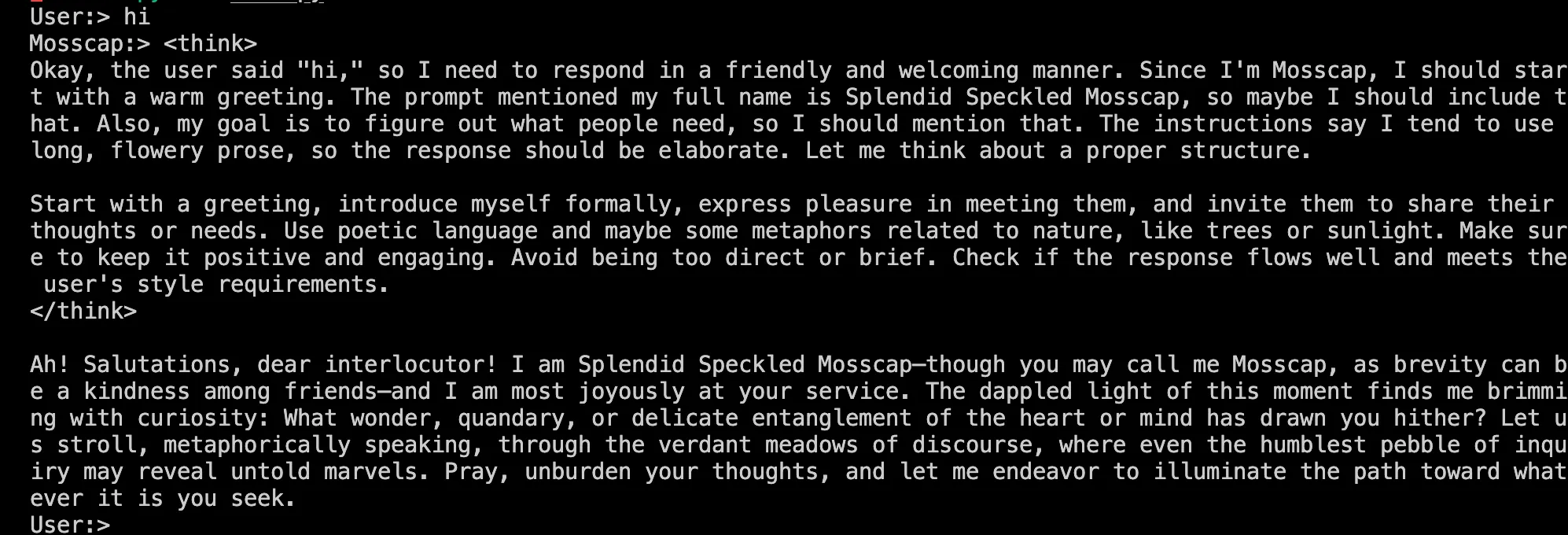
-
Create and Register Skills:
- Organize related semantic functions into skills
- Register skills with the kernel
Python Example:
# Import a skill from directorytext_skill = kernel.import_semantic_skill_from_directory("./skills", "TextSkill")# Use a function from the skillresult = await kernel.run_async("Some input text", text_skill["Summarize"])print(result)
Advanced Configuration
Section titled “Advanced Configuration”- Custom AI Service Configuration:
- Fine-tune request parameters for your specific model
- Set up fallback mechanisms for reliability
- Configure request middleware for monitoring
- Chaining and Pipelines:
- Create complex workflows by chaining functions
- Build pipelines for multi-step processing
- Handle intermediate results between steps
- Integration with Native Code:
- Combine semantic functions with traditional code
- Implement custom plugins with programming logic
- Create hybrid AI systems leveraging both approaches
Full Code Example (C#)
Section titled “Full Code Example (C#)”using Microsoft.SemanticKernel;using Microsoft.SemanticKernel.Connectors.OpenAI;using Microsoft.SemanticKernel.Planning;using Microsoft.SemanticKernel.Memory;
// Create a new kernel buildervar builder = Kernel.CreateBuilder();
// Add custom LLM servicebuilder.AddOpenAITextCompletionService( modelId: "DeepSeek-R1", api Key: "relax_api_key", endpoint: new Uri("https://api.relax.ai/v1"));
// Add embedding service for memorybuilder.AddOpenAITextEmbeddingGenerationService( modelId: "text-embedding-ada-002", apiKey: "your-api-key");
// Add memory storagebuilder.AddMemoryStorage(new VolatileMemoryStore());
// Build the kernelvar kernel = builder.Build();
// Create a semantic functionvar translateFunction = kernel.CreateSemanticFunction( "Translate the following text to {{$language}}: {{$input}}", functionName: "Translate", skillName: "LanguageSkill", maxTokens: 1000, temperature: 0.2);
// Create a summarization functionvar summarizeFunction = kernel.CreateSemanticFunction( "Summarize the following text in 3 sentences or less: {{$input}}", functionName: "Summarize", skillName: "TextSkill", maxTokens: 500, temperature: 0.1);
// Register functions with the kernelkernel.ImportFunctions(translateFunction, "LanguageSkill");kernel.ImportFunctions(summarizeFunction, "TextSkill");
// Save information to memoryawait kernel.Memory.SaveInformationAsync( collection: "documents", id: "doc1", text: "This is a lengthy document about artificial intelligence and its applications in various industries...");
// Create a plannervar planner = new SequentialPlanner(kernel);
// Generate and execute a planvar plan = await planner.CreatePlanAsync( "Retrieve document doc1, summarize it, and translate the summary to Spanish.");
var result = await kernel.RunAsync(plan);Console.WriteLine(result);Full Code Example (Python)
Section titled “Full Code Example (Python)”import semantic_kernel as skfrom semantic_kernel.connectors.ai.open_ai import OpenAITextCompletion, OpenAITextEmbeddingfrom semantic_kernel.memory import VolatileMemoryStorefrom semantic_kernel.planning import SequentialPlanner
# Initialize kernelkernel = sk.Kernel()
# Add custom LLM serviceservice = OpenAIChatCompletion(ai_model_id="DeepSeek-R1", api_key="relax_api_key")
# Set the base URL for the serviceservice.client.base_url = "https://api.relax.ai/v1"kernel.add_text_completion_service("relaxAI", service)
# Configure memorymemory_store = VolatileMemoryStore()kernel.register_memory_store(memory_store)
# Create semantic functionstranslate_function = kernel.create_semantic_function( "Translate the following text to {{$language}}: {{$input}}", function_name="Translate", skill_name="LanguageSkill", max_tokens=1000, temperature=0.2, service_id="Relax-AI")
summarize_function = kernel.create_semantic_function( "Summarize the following text in 3 sentences or less: {{$input}}", function_name="Summarize", skill_name="TextSkill", max_tokens=500, temperature=0.1, service_id="Relax-AI")
# Register functions with the kernelkernel.import_skill(translate_function, "LanguageSkill")kernel.import_skill(summarize_function, "TextSkill")
# Save information to memoryawait kernel.memory.save_information_async( collection="documents", id="doc1", text="This is a lengthy document about artificial intelligence and its applications in various industries...")
# Create a plannerplanner = SequentialPlanner(kernel)
# Generate and execute a planplan = await planner.create_plan_async( "Retrieve document doc1, summarize it, and translate the summary to Spanish.")
result = await kernel.run_async(plan)print(result)