

Kilo Code Integration
Overview
Section titled “Overview”Kilo Code is an open-source AI coding assistant for VS Code that combines the best features of Cline and Roo Code while adding its own unique capabilities. It acts as an AI development team, using natural language for code generation, refactoring, debugging, and task automation.
Key Features
Section titled “Key Features”- Multi-Mode Operation: Switch between Architect (planning), Coder (implementation), and Debugger modes
- MCP Servers Integration: Extend capabilities with custom tools via JSON-based APIs
- Context-Aware: Automatically searches for relevant context and integrates with Context7 for library documentation
- Task Orchestration: Breaks down complex projects into manageable subtasks
- Model Support: Runs with various LLM providers along with Ollama or LM Studio for offline use
Use Cases
Section titled “Use Cases”- Automating repetitive coding tasks like dependency management and test updates
- Debugging complex issues with specialized debug mode
- Architecting project structures and implementation plans
- Generating code from natural language descriptions
- Refactoring existing codebases with AI assistance
- Writing and updating documentation automatically
Use Case
Section titled “Use Case”Ideal for developers who want a comprehensive AI coding assistant that can handle everything from project planning to implementation and debugging, all within VS Code.
Setup Instructions
Section titled “Setup Instructions”-
Install Kilo Code
Install Kilo Code from the VS Code extension marketplace.
-
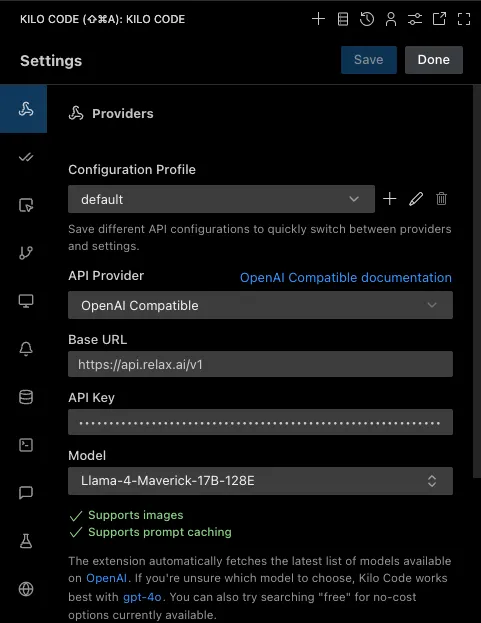
Configure Kilo Code settings
Navigate to Kilo Code settings and configure the following parameters:
- API Provider:
OpenAI Compatible - Base URL:
https://api.relax.ai/v1 - API Key:
RELAX_API_KEY - Model ID:
Llama-4-Maverick-17B-128E
- API Provider:
-
Configure advanced settings
- Enable/disable specific modes (Architect, Coder, Debugger)
- Set up custom modes for specialized tasks
- Configure MCP servers for extended functionality
- Adjust context window and token limits as needed
-
Access Kilo Code
Access Kilo Code through:
- The activity bar icon in VS Code
- Command palette:
CMD/CTRL + Shift + P→Kilo Code: Open - Keyboard shortcut:
CMD/CTRL + Shift + K
Commands and Usage
Section titled “Commands and Usage”Kilo Code provides several powerful commands and modes:
Core Commands:
/newtask- Delegate subtasks to the orchestrator/architect- Switch to architect mode for planning/code- Switch to code implementation mode/debug- Switch to debug mode for troubleshooting/mode <name>- Switch to a custom mode
Mode-Specific Features:
- Orchestrator Mode: Breaks down complex projects and coordinates between modes
- Architect Mode: Plans project structures and system design
- Coder Mode: Focuses on writing and implementing code
- Debugger Mode: Analyzes code for bugs and suggests fixes
Advanced Features
Section titled “Advanced Features”- MCP Integration: Connect to databases, APIs, and custom tools
- Memory System: AI maintains records of preferences and past work
- Multi-file Operations: Handle complex operations across multiple files
- Inline Tasks: Execute quick tasks without switching context
- Code Indexing Control: Fine-tune what code the AI can access